Coursera Shareable Certificates: How They Work, How to Share Them, and How to Build Your Own
A Coursera shareable certificate is a digital credential issued after completing a paid Coursera course or specialization. Each certificate has a unique verification URL that anyone can visit to confirm authenticity, and a one-click "Add to LinkedIn" flow that posts it to the recipient's Licenses & Certifications section. Free Coursera audits do not earn shareable certificates — only paid enrollments do.
Coursera's shareable certificates have become the gold standard for online learning credentials. With millions of learners worldwide displaying these certificates on LinkedIn, Coursera pioneered the modern approach to digital credentials. Whether you're a learner wondering how Coursera certificates work, someone trying to share one on LinkedIn, or a course creator looking to offer similar credentials for your own events, this guide covers all three angles.
Want to create similar certificates? Learn more: What Is a Shareable Certificate?
What Coursera Shareable Certificates Actually Are
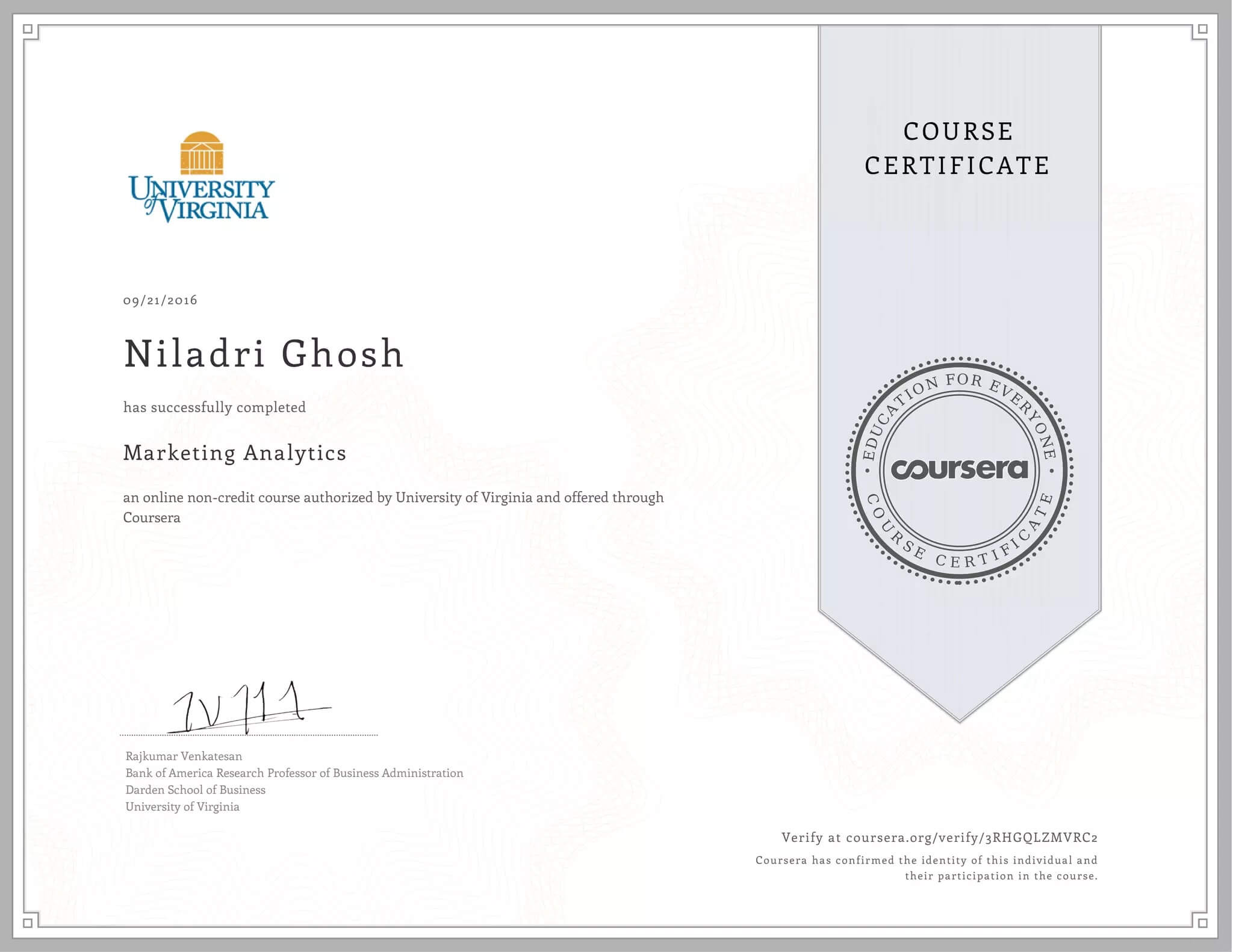
Coursera shareable certificates are digital credentials awarded when learners complete courses, specializations, or professional certificates. Each one includes:
- Learner's name and completion date
- Course or specialization title
- Coursera and university/organization logos
- Unique verification URL
- Digital instructor/institution signatures
- Professional design optimized for sharing
Unlike traditional paper certificates or PDFs, Coursera certificates are purpose-built for digital sharing and instant verification. 87% of Coursera learners report career benefits from earning them — promotions, new jobs, or salary increases — and certificates from recognised institutions (Stanford, Yale, Google, IBM) carry significant weight with recruiters.
How to Add a Coursera Certificate to LinkedIn (Step-by-Step)
If you've earned a Coursera shareable certificate, adding it to LinkedIn takes about 60 seconds. There are two routes — Coursera's one-click "Add to Profile" button is faster, but the manual route works when the button errors out.
The fast way — Coursera's "Add to Profile" button
- Open your Coursera Accomplishments page (
coursera.org/account/accomplishments). - Click the certificate you want to share.
- Click the blue Add to LinkedIn button.
- LinkedIn will pre-fill the certificate name, issuing organisation, issue date, and credential URL — review and click Save.
The manual way — if the button fails
- On Coursera, copy your certificate's verification URL (the public link starting
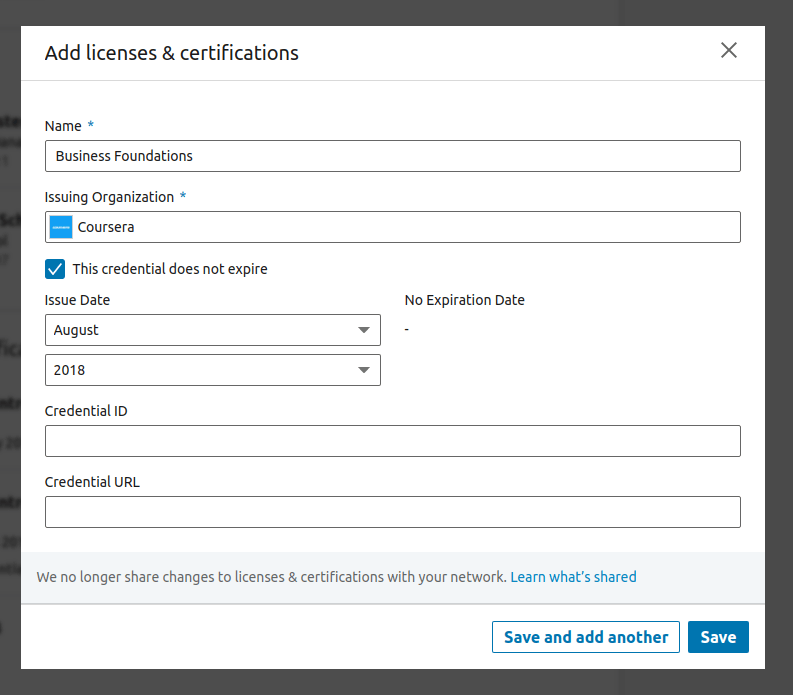
coursera.org/account/accomplishments/verify/…). - Go to your LinkedIn profile → Add profile section → Recommended → Add licenses & certifications.
- Fill in:
- Name: the course or specialization name
- Issuing organisation: Coursera (LinkedIn auto-suggests; pick the verified Coursera entry)
- Issue date: the date on the certificate
- Credential URL: paste the verification link from step 1
- Click Save. The certificate appears in your Licenses & certifications section.
Common errors
- "Add to LinkedIn" button missing — most often because the certificate is for a free Coursera audit, which doesn't earn a shareable certificate. Only paid enrollments qualify.
- Verification URL returns "page not found" — Coursera occasionally takes 24-48 hours to publish the public verification page after issuance. Wait a day and retry.
- LinkedIn doesn't recognise the issuer — make sure you select the verified Coursera entry from LinkedIn's dropdown rather than typing it in freeform.
Can You Create the Same Shareable Certificate for Your Own Webinar?
Inspired by Coursera but want to issue similar certificates for your own webinars, trainings, or courses? You don't need Coursera's infrastructure — modern certificate tools replicate the same four ingredients (branded template, unique ID, public URL, verification page) without the platform dependency.
What you need
Shareable certificate platform: unique verification URLs, LinkedIn integration, professional templates, automated delivery, social sharing features.
Professional design: customizable templates with your own branding, logos, and signatures.
Clear completion criteria: defined requirements for earning certificates (completion %, quiz scores, project submissions).
Automation: an integration with your course platform, Zoom, Google Meet, or Google Forms so certificates issue automatically when completion criteria are met.
The CertFusion approach
CertFusion provides Coursera-quality certificates for independent course creators, webinar hosts, and trainers:
Similar features:
- Unique verification links
- One-click LinkedIn sharing
- Professional templates
- Downloadable PDFs
- Social media integration
Easier setup:
- Launch in 30 minutes (no partnership requirements)
- Integrates with Zoom, Google Meet, and course platforms
- Automated delivery after completion
More affordable:
- Starting at $29/month
- Unlimited certificates on higher plans
- No revenue sharing required
Certificates tracks measurably boost engagement — Coursera partners see course completion rates rise 25-40% when a certificate is on the line, and every LinkedIn share doubles as brand exposure to the learner's professional network.
"We wanted Coursera-quality certificates for our courses. CertFusion delivered everything we needed at a fraction of the cost." — Training Provider
Try CertFusion free → — no credit card required.
Types of Coursera Certificates
Course Certificates
Single courses (4-8 weeks), $39-99 per course. Shows mastery of specific skills.
Specialization Certificates
Series of 3-10 related courses, $39-79/month subscription. Represents deeper expertise.
Professional Certificates
Career-focused programs from Google, Meta, IBM, Amazon. $39-79/month, typically 3-6 months.
MasterTrack Certificates
University-issued certificates counting toward master's degrees. $2,000-5,000 per certificate.
How to Get a Coursera Certificate
- Step 1: Choose a course with a certificate option (most paid courses include certificates).
- Step 2: Enroll in the paid certificate track — a free audit doesn't include a certificate.
- Step 3: Complete all requirements:
- Watch the lectures
- Complete the assignments
- Achieve a passing grade (typically 70-80%)
- Step 4: Receive the automatic certificate via email once all requirements are met.
- Step 5: Click "Add to LinkedIn" to share instantly (see the walkthrough above).
Key Features That Make Coursera Certificates Effective
1. Unique verification links
Every certificate includes a unique URL for instant verification. The verification page displays course details, completion date, issuing institution, and learner's name — giving employers confidence in authenticity.
Example URL: coursera.org/verify/[unique-certificate-id]
2. One-click LinkedIn integration
Coursera's seamless LinkedIn integration is a game-changer. Certificates appear in the "Licenses & Certifications" section with:
- Course name and institution logo
- Issue date and credential URL
- Coursera as the issuing organization
- Professional formatting
This makes it effortless for learners to showcase achievements to their professional network.
3. Professional design
Clean, credible design featuring:
- Consistent Coursera branding
- Partner institution logos (Stanford, Google, IBM)
- Instructor signatures
- Professional layout that signals quality
4. Multi-platform sharing
Share across LinkedIn, Facebook, Twitter, email, or direct link — each with attractive preview images and instant verification.
5. Downloadable PDFs
While certificates live online, learners can download high-resolution PDFs for printing, portfolios, or job applications.
Are Coursera Certificates Worth It?
When they're valuable
- ✓ Career changers demonstrating skills in a new field
- ✓ Skills-gap filling for a current or desired role
- ✓ Freelancers building credibility with clients
- ✓ Early-career professionals building portfolios
- ✓ Continuous learners showing professional development
When they may not be
- ✗ Established experts with extensive credentials already
- ✗ Roles requiring formal degrees specifically
- ✗ Very tight budgets ($39-79/month may not be feasible)
- ✗ Time-constrained individuals unable to commit 3-10 hours/week
What employers think
Most employers view Coursera certificates positively as evidence of:
- Initiative and self-motivation
- Commitment to continuous learning
- Practical skills in current technologies
- Ability to complete challenging work
That said, certificates complement rather than replace work experience or formal degrees for most positions.
Alternatives to Coursera
For learners
- Udemy: $10-200 per course (frequent sales)
- LinkedIn Learning: included with LinkedIn Premium
- edX: $50-300 verified certificates
- Google Career Certificates: $39/month
For course creators
- CertFusion: create your own shareable certificates ($29-99/month)
- Teachable/Thinkific: course platforms with certificates
- Accredible: enterprise solution
- Credly: digital badges platform
Frequently Asked Questions
Do Coursera certificates expire?
Most don't expire and remain valid indefinitely in your Coursera account. A small number of professional certificates carry an expiration date when the underlying content is expected to become outdated (e.g. specific platform-version training). The verification URL stays live as long as your Coursera account remains active.
Can I get a Coursera shareable certificate for free?
Free Coursera audits give you access to course materials but do not earn a shareable certificate. To receive one you need a paid enrollment, a Coursera Plus subscription, an approved financial-aid application, or sponsored access through an employer or scholarship program.
Are Coursera certificates recognised by employers?
Recognition varies by employer and field. Certificates from university-issued specializations and professional certificates from companies like Google, Meta, and IBM tend to carry the most weight. The shareable verification URL is what makes the credential checkable — employers can confirm the certificate is real in one click.
Can I add a Coursera certificate to my CV or resume?
Yes. List it under a "Certifications" section with the certificate name, the issuing organisation (Coursera plus the partner university or company), the date earned, and the verification URL so reviewers can confirm authenticity.
What if my Coursera certificate verification URL is broken?
Verification URLs occasionally fail to publish in the first 24-48 hours after issuance. If the URL still returns a "page not found" error after two days, contact Coursera support — they can re-issue the public verification page from your account record.
Can I add multiple Coursera certificates to LinkedIn?
Yes. Each certificate appears as a separate entry in your LinkedIn Licenses & Certifications section. There is no limit — learners with 10+ Coursera certificates display each one individually with its own verification URL.
Can I issue shareable certificates for my own webinar or course?
Yes. Tools like Certfusion let you issue branded certificates with a unique verification URL for each recipient — the same model Coursera uses — without running your own LMS. You upload your participant list (CSV) and recipients receive a verifiable, LinkedIn-shareable certificate.
Related Articles
- What Is a Shareable Certificate? → Complete guide
- How to Create a Shareable Certificate → Step-by-step tutorial
- How to Add a Certificate to LinkedIn → Maximize visibility
- Top Certificate Platforms 2025 → Compare options
Table of Contents
Related Articles
Discover more insights and stories that might interest you